0 ratings


Item #:
86497517
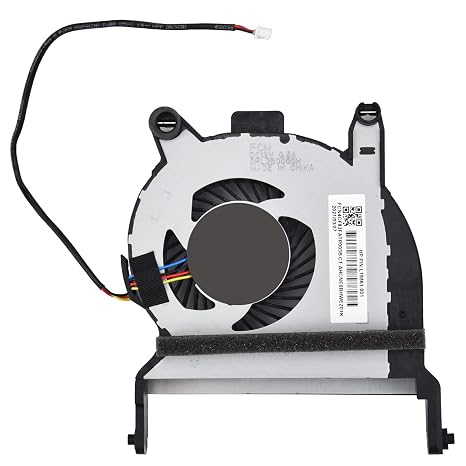
Replacement CPU Cooling Fan for HP Elitedesk 800 705 G4 G5, ProDesk 400 405 G4 G5 G6 & ProDesk 600 G4 Series Mini Desktop P/N: FL3B L19561-001
90% of respondents would recommend this to a friend
Item #:
86497517
SRD 673
Price Details
Excluding Shipping & Custom charges ( Shipping and custom charges will be calculated on checkout )
*All items will import from US
0 ratings
Write a review
In stock
 Imported from USA store
QTY:
Order now and get it around Thursday, October 01
Secured transaction
Ubuy works hard to protect your security and privacy. Our advanced payment security system ensures confidentiality by encrypting your information during transmission using AES (Advanced Encryption Standards) and SSL (Secure Socket Layer) protocols. Your payment details are 100% secure as we do not share your payment details with third party sellers.
Our Top Logistics Partners


Brand New Replacement CPU Cooling Fan for your faulty/ cracked/ broken Laptop Cooling Fan

Fast
Shipping

Free
Return*

Secure Packaging

100% Original Products

PCI DSS Compliance

ISO 27001 Certified



What Stands Out
Optimal Cooling
Engineered for HP Elitedesk and ProDesk series, this fan ensures efficient heat dissipation, enhancing system performance and prolonging the lifespan of your desktop.
Easy Installation
Designed for straightforward replacement, this cooling fan requires minimal technical skill, ensuring you can efficiently upgrade your system without professional assistance.
Compatibility Assurance
This fan is specifically tailored for various HP models, guaranteeing a perfect fit and optimal performance, reducing the risk of malfunction compared to universal alternatives.
Product Details
| Power Connector Type | 4-Pin |
| Voltage | 12 volts |
| Wattage | 3 watts |
| Cooling Method | Air |
| Compatible Devices | Elitedesk 705 G4 G5, HP Elitedesk 800 G4 G5, ProDesk 400 G4 G5 G6 & ProDesk 405 G4 G5, ProDesk 600 G4 G5 Mini Desktop |
| Noise Level | 5 db |
| Material Type | Metal |
| Brand Name | KBRPARTS |
| Number of Packs | 1 |
| Manufacturer | KBRPARTS |
| Number of Items | 1 |
| Unit Count | 1 Count |
| Included Components | CPU Fan |
| Item Weight | 0.1 kg |
| Model | L19561-001 |
| Part Number | L19561-001 |
| Brand | KBRPARTS |
| Compatible Devices | Elitedesk 705 G4 G5, HP Elitedesk 800 G4 G5, ProDesk 400 G4 G5 G6 & ProDesk 405 G4 G5, ProDesk 600 G4 G5 Mini Desktop See more |
| Material | Metal |
Who Should Buy?

-
HP Desktop Users
Ideal for users of HP EliteDesk and ProDesk models requiring reliable cooling solutions for optimal performance.
-
System Upgraders
Perfect for those upgrading hardware or modifying their desktops, ensuring efficient cooling during high-performance tasks.
-
DIY Enthusiasts
Great choice for tech enthusiasts interested in assembling or repairing desktops, needing a reliable cooling fan replacement.

-
Non-HP Computers
Unsuitable for users with non-HP desktops or other brands due to compatibility issues with different models.
Product Description
Replacement CPU Cooling Fan for HP Elitedesk 800 705 G4 G5, ProDesk 400 405 G4 G5 G6 & ProDesk 600 G4 Series Mini Desktop P/N: FL3B L19561-001
Have any Query? Chat with us
Customer Questions & Answers
-
Question:
What compatibility options are available for the Replacement CPU Cooling Fan?
Answer: This replacement CPU cooling fan is specifically designed for various models within the HP EliteDesk and ProDesk series, including the HP EliteDesk 800 G4, G5, EliteDesk 705 G4, G5, and ProDesk 400 G4, G5, G6, as well as the ProDesk 600 G4, G5 Mini Desktop. These fans are crucial for maintaining optimal performance and thermal management of your system, preventing overheating and ensuring longevity. If you're upgrading or replacing your fan, ensure you verify your model number for a perfect match. -
Question:
How do I know if my CPU cooling fan needs to be replaced?
Answer: Signs that your CPU cooling fan may need replacement include abnormal noises like grinding or rattling, decreased performance due to overheating, or your system shutting down unexpectedly. If you observe excessive dust accumulation or physical damage to the fan blades, those are also indicators of failure. Keeping an eye on system temperatures using monitoring tools can help you ensure efficient performance and timely replacement when necessary. -
Question:
What tools do I need to replace the CPU cooling fan?
Answer: To replace the CPU cooling fan, you typically need a Phillips-head screwdriver, thermal paste for reinstalling, and possibly an anti-static wrist strap to protect components. Begin by turning off and unplugging your device before disassembly. After removing the case and unscrewing the old fan, clean the CPU surface with isopropyl alcohol before applying new thermal paste and installing the new fan. This helps maintain good thermal conductivity and ensures your system runs effectively. -
Question:
Can I install the CPU cooling fan myself?
Answer: Yes, installing the CPU cooling fan is a task many users can perform with basic technical skills. Ensure you have the correct tools and follow a step-by-step guide or video tutorial specific to your HP model. By replacing it yourself, you not only save on service costs but also gain valuable experience in computer maintenance, enhancing your overall technical knowledge and capability. -
Question:
What are the benefits of a high-quality CPU cooling fan?
Answer: A high-quality CPU cooling fan significantly improves airflow within your computer, which is critical for maintaining temperature control during high-performance tasks like gaming or heavy multitasking. Enhanced cooling leads to better overall performance and can prolong the lifespan of your CPU and other components by preventing overheating. Additionally, a quiet fan can create a more pleasant working environment, minimizing noise distractions. -
Question:
How often should I clean my CPU cooling fan?
Answer: It is advisable to clean your CPU cooling fan every 6 months, or more frequently if your environment is dusty. Dust build-up can severely impede airflow, leading to overheating issues. Regular cleaning helps maintain efficient operation. Use compressed air to remove dust from the fan blades and surrounding areas and ensure proper cooling performance, ultimately prolonging the life of your desktop hardware. -
Question:
What is the role of thermal paste in CPU cooling?
Answer: Thermal paste plays a critical role in heat transfer between the CPU and the heat sink or cooling fan. It fills microscopic gaps and imperfections on the surfaces to ensure optimal heat dissipation. When replacing your CPU cooling fan, it's essential to clean off old thermal paste and reapply a new layer to prevent overheating and maintain efficient cooling. This ensures that your CPU operates at ideal temperatures during demanding tasks. -
Question:
What are the signs of a malfunctioning CPU cooling fan?
Answer: Malfunctioning CPU cooling fans may exhibit symptoms such as unusual noises, fluctuating CPU temperatures, and system instability. If you can feel excessive heat emanating from the CPU area or notice that your computer frequently shuts down or restarts, these could indicate fan issues. Inconsistent fan speeds or failure to spin altogether are critical signs that should prompt immediate action to replace the cooling fan. -
Question:
Where can I buy a Replacement CPU Cooling Fan for my HP desktop?
Answer: You can purchase the Replacement CPU Cooling Fan for HP EliteDesk and ProDesk series from Ubuy. Ubuy offers a wide selection of computer components, ensuring you find the right fan for your specific model. Shopping at Ubuy not only provides access to genuine parts but also convenient delivery options to your doorstep, making it easy to keep your HP desktop running efficiently. -
Question:
Is there a difference between OEM and aftermarket CPU cooling fans?
Answer: Yes, OEM (Original Equipment Manufacturer) cooling fans are specifically made for your device and tend to fit better and perform more reliably than aftermarket options. While aftermarket fans might be more affordable, they may not offer the same build quality or compatibility. For optimal performance and peace of mind, particularly for high-use computers, OEM fans are usually recommended as they ensure the cooling needs of your specific model are precisely met.
KBRPARTS CPU Cooling Fans Editorial Review
Replacement CPU Cooling Fan for HP Elitedesk 800 705 G4 G5, ProDesk 400 405 G4 G5 G6 & ProDesk 600 G4 Series Mini Desktop P/N: FL3B L19561-001 is an effective solution for those experiencing fan issues in their HP devices. With its 4-pin power connector and efficient 12 volts operation, this fan operates at a minimal noise level of just 5 db, ensuring a quieter computing environment. Many users praise its compatibility and easy installation, noting that it fits perfectly in model 705 G4 and working quietly, providing improved performance over older, noise-ridden fans. Some users did mention minor concerns regarding packaging but overall found it a reliable and affordable alternate to pricier originals.
Customer Reviews & Ratings
1 customers ratings
-
5 Star
100%
-
4 Star
0%
-
3 Star
0%
-
2 Star
0%
-
1 Star
0%
Review this product
Share your thoughts with other customers
Pros
- Fits perfectly for multiple HP models
- Quieter operation than older fans
- Easy installation with no modifications
- Affordable alternative to OEM parts
- Effective cooling with low noise
Platform Trust & Buyer Confidence

JK
Jasmin
Verified buyer
“Great products and very good service: very easy and very fast international delivery.”
9 September 2026 · via Trustpilot
AG
Anke
Verified buyer
“Wonderful online shopping experience, smooth transaction from the start. Payment method works conveniently and delivery is unexpectedly fast and reliable. You go the extra mile for service. What makes this even more amazing, you deliver to Namibia. I will remain a happy Ubuy customer and will increase my purchases for sure! Thank you!”
10 September 2026 · via Trustpilot
H
Hazel
Verified buyer
“Very easy to find the products what you need, and so fast delivery, that’s why I highly recommended to others costumers to used ubuy.”
10 September 2026 · via Trustpilot
O
Opaleye
Verified buyer
“I received exactly what I ordered I was skeptical about your site because that was my first time to order. But the order came timely and neatly packaged. I was not disappointed. Thank you.”
11 September 2026 · via Trustpilot
AC
Adele
Verified buyer
“Easy to find and order what you want on the website. Delivery is quick to the UK”
8 September 2026 · via Trustpilot
Secure Checkout
Global Delivery
Easy Returns
Genuine Products
Product Price History
Important information
- Limitations : For products shipped internationally, please note that any manufacturer warranty may not be valid; manufacturer service options may not be available; product manuals, instructions, and safety warnings may not be in destination country languages; the products (and accompanying materials) may not be designed in accordance with destination country standards, specifications, and labeling requirements; and the products may not conform to destination country voltage and other electrical standards (requiring use of an adapter or converter if appropriate). The recipient is responsible for assuring that the product can be lawfully imported to the destination country. When ordering from Ubuy or its affiliates, the recipient is the importer of record and must comply with all laws and regulations of the destination country.
- Not all the products listed on Ubuy are for sale, as Ubuy is a global search engine. Products are subject to export/trade regulations.
SRD 673
Order now and get it around Thursday, October 01
This item is not restrict in my country.(Please click on above link if this item is not restrict in your country, So our team will review and allow.)
QTY:
Secured transaction
PCI DSS compliant and ISO 27001:2022 certified, with encrypted payments and full buyer protection on every order.
Our Top Logistics Partners
Fastest cross-border delivery
Features & Benefits
- Compatible with various HP Elitedesk and ProDesk models
- Package includes 1 replacement CPU fan
- Each fan tested before shipping
- Direct replacement for damaged cooling fans
- Contact for any inquiries or issues
- Voltage: DC12V
Ubuy Assurance
Experience worry-free shopping with 100% original products, PCI DSS-compliant payment security, ISO 27001-certified data protection, the fastest cross-border delivery, free returns *, and secure packaging on every order.